Skip to content

NinzaHost Blog

NinzaHost Blog

  • Home
  • Hosting
  • Contact Us
  1. Home
  2. /Cpanel
  3. /How to Fix cPanel error- public_html renamed/malware detected by Imunify360?
How to fix cPanel error by Imunify360

How to Fix cPanel error- public_html renamed/malware detected by Imunify360?

Imunify360, Cpanel / July 4, 2021 / NinzaHost / 0

Are you getting an error “public_html renames/malware detected”? If yes then don’t worry, you will learn today how you can fix cPanel error by Imunify360.

So in order to fix this issue first you need to understand about this.

Let me tell you that this type of error only comes after you transfer infected or vulnerable website from somewhere to NinzaHost or it may also come because of vulnerable website like WordPress with infected themes or plugins.

Imunify360 detects the malwares in a website and automatically rename public_html so that no one could access it.

And as soon public_html is renamed the website begins to throw 404 error. This security measure is only to ensure the hardening of the website.

Let’s move on to the topic without any delay.

Steps to fix cPanel error by Imunify360 :

You just need to follow some simple steps in order to fix this error.

STEP 1 – Login To Your cPanel Account

  • Go to NinzaHost.
  • Login your Account.
  • Select your Active Product/Services.
  • Click on “Login to cPanel” under Action Tab.
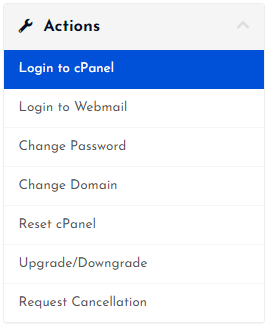
Login to cPanel

  • Then you will automatically redirected to your cPanel Account.

Or, If you have cPanel login details then you can easily login to your cPanel account by visiting yourdomain.com/cpanel.

STEP 2 – Go To Imunify360

  • Navigate to Security Tab.
  • Click on Imunify360.

Go to Imunify360

  • Here you will see the Malware detected by Imunify360.

STEP 3 – Fix the Malicious Files

  • Check the Malicious files in Imunify360.
  • Fix them manually if you are good in it or contact the developer.

Check & Fix Malicious Files

  • After fixing all the error, you just need to do a simple task that is :

Rename the folder back to public_html and your website will be live.

You can install hardened WordPress by renaming wp-config.php in your WordPress website or by renaming /wp-admin from the WordPress admin login URL.

Hope you will find this article helpful and you can now easily fix cPanel error by Imunify360.

If you still have any doubt please let us know through the comment section below.

Post Views: 333

fix 404 error using Imunify360, fix cpanel error by Imunify360, how to fix cPanel error by Imunify360

NinzaHost

Affordable Web Hosting Provider

How to unblock IP from Client Area? How to scan your website for Virus or Malware?

Related posts

What is a cPanel? The Ultimate Web Hosting Control Panel

What is a cPanel? The Ultimate Web Hosting Control Panel

How to Change Your cPanel Password from Client Area?

How to Change cPanel Password from Client Area?

How to Reset Your cPanel via Client Area?

How to Reset Your cPanel via Client Area?

How to Login to cPanel from Client Area?

How to Login to cPanel from Client Area?

How to manage DNS Records from cPanel?

How To restore WordPress Backup From Softaculous

Latest posts

How to Enable ID Protection for Your Domain

How to Enable ID Protection for Your Domain?

How to get your domain Authentication Code from Client Area

How to get your Domain Authentication Code from Client Area?

How to check and reply to your opened tickets

How to Check & Reply To Your Opened Tickets

How to renew your web hosting service?

How to renew your web hosting service?

How to View and Pay Your Invoice from Client Area?

How to Enable Transfer Lock for Your Domain?

How to Enable Transfer Lock for Your Domain?

Leave a Comment

Leave a Reply Cancel reply

Your email address will not be published. Required fields are marked *

SEARCH HERE

Recent Posts

  • How to Enable ID Protection for Your Domain?
  • How to get your Domain Authentication Code from Client Area?
  • How to Check & Reply To Your Opened Tickets
  • How to renew your web hosting service?
  • How to View and Pay Your Invoice from Client Area?

Copyright © 2026 NinzaHost

Search